Count Suruo - days count3.2
Publisher Description


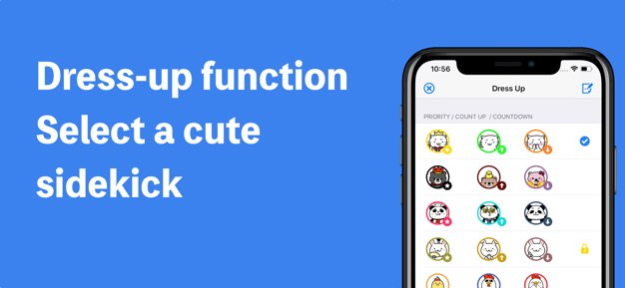

Count Suruo is a kawaii app that can be confirmed easily by listing the "many days left until the scheduled date" and "whether has passed that day many days from".
Since then it corresponds to both of the countdown and count up, available in a variety of applications.
■Count example of
・How many days have passed from birth?
・What day from joining?
・What day from married?
・How many days remaining until the average life span?
・It has passed many days from a diet start?
・How many days remaining this year?
・Socializing How many days have passed for the first time?
・How many days remaining until retirement?
・How many days remaining until the recital?
・How many days left until the Olympic Games in Tokyo?
・How many days remaining until graduation?
・Many days have passed after replacing the toothbrush?
Records management, of course, and is ideal for confirmation and target management of the anniversary.
■Main function
・Count up count down from the specified date
・Timer display "year, month, day, hour, minute, second"
・Sort of ascending or descending order
・Sound effects
・Dress function (cat, bear, panda, etc.)
・Date format change function
・Count up the start date selection function (day 0 Start or day 1 start)
・Memo function
・Widget
By setting the priority, you can display the count in the upper right corner of the icon.However, the count that you can set the priority has become the only one.
Also, count the priority is set, the "year, month, day, hour, minute, second" can also be made to display a timer that can be checked in real time.(It can be switched between display and non-display)
Version History ・End of support for iOS 16
・Internal improvements 3.2 Jun 16 ・Added Home Screen widgets
・Internal improvements 3.1 Apr 27 ・Support for iOS 26
・End of support for iOS 15
・Library updates 3.0 Jan 16 ・End of support for iOS 14
・Library Update
・Minor bug fixes 2.31 08/07/2025 ・Minor bug fixes
・Library Update
・Improved some UI elements 2.30 03/09/2025 ・Minor bug fixes and performance improvements
・GDPR compliance in some regions 2.29 12/15/2023 ・Minor bug fixes and performance improvements 2.28 07/25/2023 ・Added color customization function
You can now change the theme and text color for each count.
You can set the color customize by purchasing the in-app purchase.
・End of support for iOS 13 2.27 03/15/2023 ・End of support for iOS 12
・Minor bug fixes and performance improvements 2.26 01/20/2023 ・Minor bug fixes and performance improvements 2.25 07/31/2022 Fixed a bug with in app purchases 2.24 07/01/2022 ・Bug Fixes 2.23 04/26/2022 ・End of support for iOS 11 2.22 04/04/2022 ・Supports iOS 15 2.21 11/26/2021 ・Minor bug fixes and performance improvements 2.20 08/15/2021 ・Compatible with iOS 14.5 2.19 05/29/2021 ・Added "Average Reset Interval" to Reset History
・Minor bug fixes and performance improvements 2.18 02/12/2021 ・Minor bug fixes and performance improvements 2.17 01/09/2021 ・Supports iOS 14
・End of support for iOS 10 2.16 10/06/2020 ・Minor bug fixes and performance improvements 2.15 07/26/2020 ・ End of support for iOS 9 2.14 07/13/2020 ・Introduction of point system
・Minor bug fixes 2.13 06/24/2020 ・Change some internal processing 2.12 04/26/2020 ・New character "Shiba Inu" added 2.11 11/27/2019 ・ End of support for iOS 8
・ Change some internal processing 2.10 11/02/2019
About Count Suruo - days count
The company that develops Count Suruo - days count is mitsuhiro nara. The latest version released by its developer is 3.2.
To install Count Suruo - days count on your iOS device, just click the green Continue To App button above to start the installation process. The app is listed on our website since 2026-10-15 and was downloaded 4 times. We have already checked if the download link is safe, however for your own protection we recommend that you scan the downloaded app with your antivirus. Your antivirus may detect the Count Suruo - days count as malware if the download link is broken.
How to install Count Suruo - days count on your iOS device:
- Click on the Continue To App button on our website. This will redirect you to the App Store.
- Once the Count Suruo - days count is shown in the iTunes listing of your iOS device, you can start its download and installation. Tap on the GET button to the right of the app to start downloading it.
- If you are not logged-in the iOS appstore app, you'll be prompted for your your Apple ID and/or password.
- After Count Suruo - days count is downloaded, you'll see an INSTALL button to the right. Tap on it to start the actual installation of the iOS app.
- Once installation is finished you can tap on the OPEN button to start it. Its icon will also be added to your device home screen.
Program Details
System requirements
Download information
Pricing
Version History
version 3.2
posted on 2026-10-15
Version History ・End of support for iOS 16
・Internal improvements 3.2 Jun 16 ・Added Home Screen widgets
・Internal improvements 3.1 Apr 27 ・Support for iOS 26
・End of support for iOS 15
・Library updates 3.0 Jan 16 ・End of support for iOS 14
・Library Update
・Minor bug fixes 2.31 08/07/2025 ・Minor bug fixes
・Library Update
・Improved some UI elements 2.30 03/09/2025 ・Minor bug fixes and performance improvements
・GDPR compliance in some regions 2.29 12/15/2023 ・Minor bug fixes and performance improvements 2.28 07/25/2023 ・Added color customization function
You can now change the theme and text color for each count.
You can set the color customize by purchasing the in-app purchase.
・End of support for iOS 13 2.27 03/15/2023 ・End of support for iOS 12
・Minor bug fixes and performance improvements 2.26 01/20/2023 ・Minor bug fixes and performance improvements 2.25 07/31/2022 Fixed a bug with in app purchases 2.24 07/01/2022 ・Bug Fixes 2.23 04/26/2022 ・End of support for iOS 11 2.22 04/04/2022 ・Supports iOS 15 2.21 11/26/2021 ・Minor bug fixes and performance improvements 2.20 08/15/2021 ・Compatible with iOS 14.5 2.19 05/29/2021 ・Added "Average Reset Interval" to Reset History
・Minor bug fixes and performance improvements 2.18 02/12/2021 ・Minor bug fixes and performance improvements 2.17 01/09/2021 ・Supports iOS 14
・End of support for iOS 10 2.16 10/06/2020 ・Minor bug fixes and performance improvements 2.15 07/26/2020 ・ End of support for iOS 9 2.14 07/13/2020 ・Introduction of point system
・Minor bug fixes 2.13 06/24/2020 ・Change some internal processing 2.12 04/26/2020 ・New character "Shiba Inu" added 2.11 11/27/2019 ・ End of support for iOS 8
・ Change some internal processing 2.10 11/02/2019
version 3.1
posted on 2026-06-02
Version History ・Added Home Screen widgets
・Internal improvements 3.1 Apr 27 ・Support for iOS 26
・End of support for iOS 15
・Library updates 3.0 Jan 16 ・End of support for iOS 14
・Library Update
・Minor bug fixes 2.31 08/07/2025 ・Minor bug fixes
・Library Update
・Improved some UI elements 2.30 03/09/2025 ・Minor bug fixes and performance improvements
・GDPR compliance in some regions 2.29 12/15/2023 ・Minor bug fixes and performance improvements 2.28 07/25/2023 ・Added color customization function
You can now change the theme and text color for each count.
You can set the color customize by purchasing the in-app purchase.
・End of support for iOS 13 2.27 03/15/2023 ・End of support for iOS 12
・Minor bug fixes and performance improvements 2.26 01/20/2023 ・Minor bug fixes and performance improvements 2.25 07/31/2022 Fixed a bug with in app purchases 2.24 07/01/2022 ・Bug Fixes 2.23 04/26/2022 ・End of support for iOS 11 2.22 04/04/2022 ・Supports iOS 15 2.21 11/26/2021 ・Minor bug fixes and performance improvements 2.20 08/15/2021 ・Compatible with iOS 14.5 2.19 05/29/2021 ・Added "Average Reset Interval" to Reset History
・Minor bug fixes and performance improvements 2.18 02/12/2021 ・Minor bug fixes and performance improvements 2.17 01/09/2021 ・Supports iOS 14
・End of support for iOS 10 2.16 10/06/2020 ・Minor bug fixes and performance improvements 2.15 07/26/2020 ・ End of support for iOS 9 2.14 07/13/2020 ・Introduction of point system
・Minor bug fixes 2.13 06/24/2020 ・Change some internal processing 2.12 04/26/2020 ・New character "Shiba Inu" added 2.11 11/27/2019 ・ End of support for iOS 8
・ Change some internal processing 2.10 11/02/2019 ・ Supports iOS 13
・ Change some internal processing 2.9 10/15/2019
version 3.0
posted on 2026-01-16
・Support for iOS 26
・End of support for iOS 15
・Library updates
version 2.31
posted on 2025-08-07
Aug 7, 2025
Version 2.31
・End of support for iOS 14
・Library Update
・Minor bug fixes
version 2.30
posted on 2025-03-09
Mar 9, 2025
Version 2.30
・Minor bug fixes
・Library Update
・Improved some UI elements
version 2.29
posted on 2023-12-15
Dec 15, 2023
Version 2.29
・Minor bug fixes and performance improvements
・GDPR compliance in some regions
version 2.28
posted on 2023-07-25
Jul 25, 2023
Version 2.28
・Minor bug fixes and performance improvements
version 2.27
posted on 2023-03-15
Mar 15, 2023
Version 2.27
・Added color customization function
You can now change the theme and text color for each count.
You can set the color customize by purchasing the in-app purchase.
・End of support for iOS 13
